


Articles
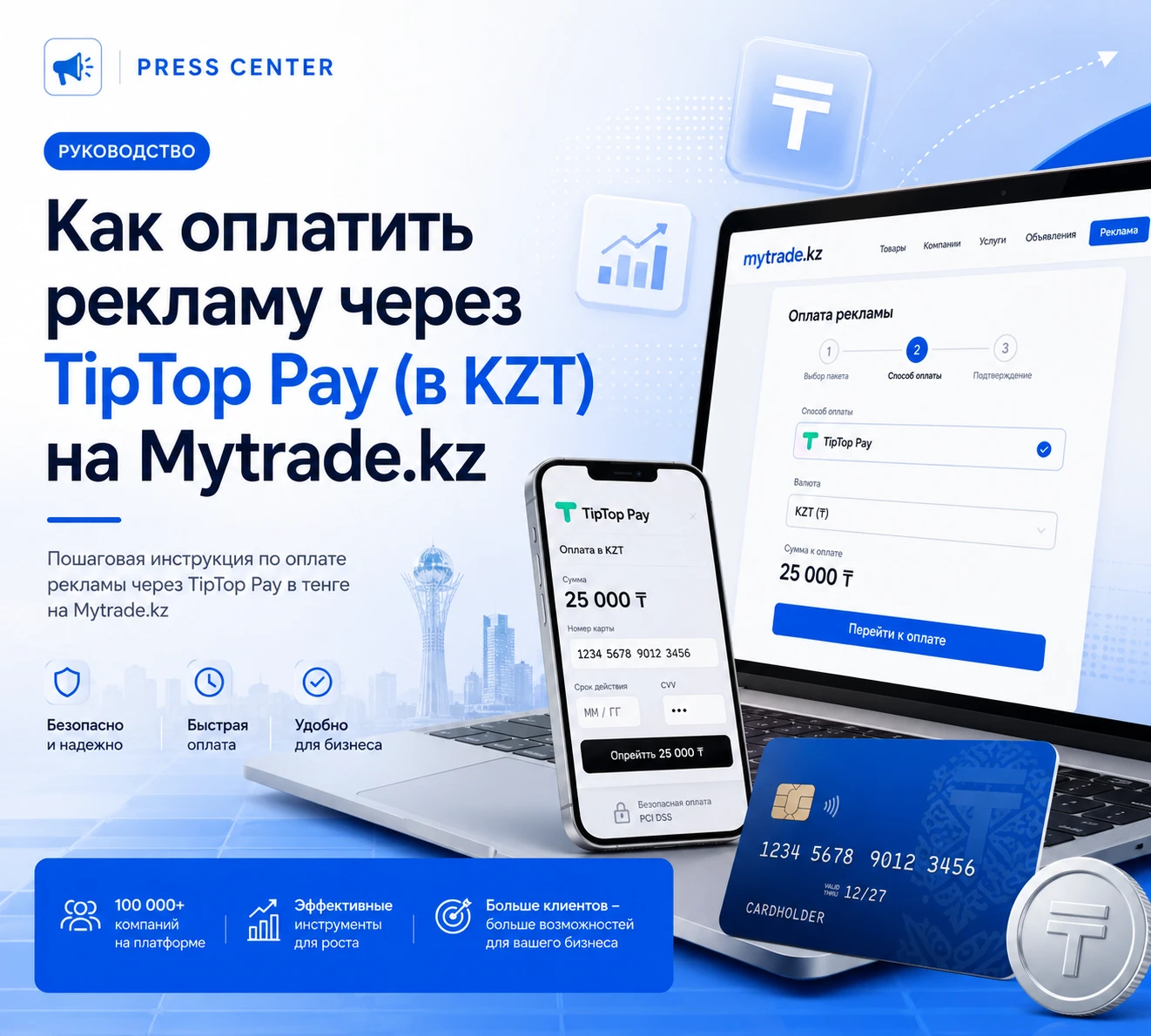
TipTop Pay is the primary method for paying for Mytrade.kz ads for users in Kazakhstan. Payments are processed in tenge, without conversion or unnecessary steps.
In this guide, we'll cover:
- Who is TipTop Pay suitable for?
- How the payment process works step by step;
- What to do if your payment fails;
- Answers to frequently asked questions
Who is TipTop Pay suitable for?
TipTop Pay is right for you if:
- You are located in Kazakhstan
- You pay for ads in tenge (KZT)
- You want to see the final amount without currency conversion
- You prefer local Kazakhstani payment services
This method is used by both individuals and companies.
What can I pay with TipTop Pay?
With TipTop Pay on Mytrade.kz, you can:
- pay for advertising for a single ad
- select multiple advertising services at once (VIP, "Hot," boost, renewal)
- pay for advertising packages
- top up your balance and use it for future payments
All transactions are processed in tenge.
Step-by-step instructions for paying with TipTop Pay
Step 1. Select an ad and advertising services
You can enable advertising:
- during ad publication, or
- after publication, through your personal account
Select the desired ad and select the advertising services you want to enable. You can select *multiple services at once.*
Step 2. Check the amount, currency, and payment country
After selecting advertising services, the system automatically generates the payment:
- calculates the total cost of the selected services
- displays the amount in tenge (KZT)
- displays it before confirming the payment
At this stage, you must:
- select the currency KZT
- select the country Kazakhstan
After selecting the currency and country, the system automatically selects an available payment method. For Kazakhstan, the TipTop Pay payment system is displayed by default.
At this step, you already know exactly:
- the amount you are paying
- the currency
- the payment service you will use
Step 3. Go to the TipTop Pay payment interface and confirm the payment
After clicking the "Pay" button, you will be redirected to the TipTop Pay payment interface—a secure payment system page. In the TipTop Pay interface, you need to:
- enter your bank card details
- if necessary, specify an email address to receive a receipt
- confirm the payment
🔒 Important:
The payment is processed directly through TipTop Pay. Mytrade.kz does not store or process your bank card details—they are entered only in the secure TipTop Pay payment interface and transmitted over an encrypted connection.
TipTop Pay complies with payment security requirements, supports 3-D Secure, and is listed in the payment organization register under number 02-23-170 dated 06.10.2023.
This guarantees the security of the transaction and the protection of your financial data at all stages of the payment process.
After successful confirmation:
- the payment is processed instantly
- you are returned to Mytrade.kz
- a notification about successful payment appears
Advertising is activated automatically, without any additional action on your part.
Step 4. Confirm payment
Follow the TipTop Pay instructions:
- Enter the required payment information
- Confirm the transaction
After successful payment, you will be automatically returned to Mytrade.kz.
Step 5. Check ad activation
After payment:
- Ads are activated immediately
- Service status is displayed in your personal account
- Ad validity periods begin automatically
If you topped up your balance, funds will be available immediately after they are credited.
What to do if your payment failed
If your TipTop Pay payment failed:
- Refresh the page and try again
- Check that the information you entered is correct
- Make sure there are sufficient funds on your card
- If necessary, select a retry payment
In most cases, retrying resolves the issue.
Frequently Asked Questions
Can I pay for multiple services in one payment?
Yes. You can select multiple advertising services for a single ad and pay for them in one payment through TipTop Pay.
Can I top up my balance through TipTop Pay?
Yes. TipTop Pay supports topping up your balance in tenge, after which you can pay for advertising without re-entering your details.
When will advertising start running?
Ads are activated immediately after successful payment.
Are there any hidden fees?
No. The final amount is displayed before payment is confirmed.
When to choose TipTop Pay
TipTop Pay is the best choice if you value:
- paying in tenge
- quickly launching ads
- avoiding currency nuances
- using a clear local service
How advertising is launched
Paying for advertising through TipTop Pay on Mytrade.kz follows a clear process:
- you select the desired advertising services
- see the final amount in advance
- confirm the payment
- advertising is launched immediately after payment
Everything is designed to ensure that promotions begin running without delays. Proceed to posting your ad, select advertising services, and start promoting at a time convenient for you.
поделится


Еще статьи
Articles
03.06.2024

The "Job" module on Mytrade.kz is an innovative platform designed for a convenient and effective search for vacancies and candidates. This section provides powerful functionality for both employers and job seekers, providing the ability to quickly find the right specialists or jobs. In this review, we will look at the main features and advantages of the “Work” module on Mytrade.kz.
Overview of the functionality of the "Work" module on Mytrade.kz
Vacancies for companies
For companies seeking to find talented employees, the “Work” module on Mytrade.kz offers a number of convenient functions:
1. Publishing vacancies:
Companies can easily and quickly post vacancies, indicating all the necessary requirements and conditions. This process is intuitive and does not require complicated steps.
2. Filtering and Search:
Employers can use convenient search and filtering tools to find suitable candidates based on various criteria such as work experience, education and skills.
3. Manage vacancies:
In your personal account, companies can manage their vacancies, edit them, update them or delete them as necessary. This helps keep the information up-to-date and accurate.
4. Communication with candidates:
The platform provides convenient tools for communicating with applicants. Employers can send messages, schedule interviews and receive responses to vacancies through the internal communication system Mytrade.kz.
Resume for applicants
Job seekers can take advantage of the following features of the "Work" module on Mytrade.kz:
1. Resume Posting:
Users can create and post their resumes on the platform by providing all the important details such as work experience, education, skills and preferences.
2. Search Jobs:
Job seekers can easily search for jobs using various filters and categories. This allows them to quickly find offers that match their professional profile and preferences.
3. Job Responses:
The platform allows job seekers to apply to positions of interest by sending their resumes and cover letters directly to employers.
4. Profile Update: Job seekers can regularly update their resumes and profiles to keep them current and catch the attention of employers.
Advantages of the "Work" module on Mytrade.kz
The "Work" module on Mytrade.kz provides users with a number of significant advantages:
1. Free access:
Both companies and job seekers can use all the functions of the module for free. This makes the platform accessible to all labor market participants.
2. Intuitive Interface:
The platform is designed keeping in mind the needs of users, offering a simple and intuitive interface that makes the search and application process easier.
3. Wide opportunities:
Thanks to the variety of functions, the “Work” module on Mytrade.kz covers all aspects of job search and personnel selection, making this process as convenient and efficient as possible.
4. Security and confidentiality:
Mytrade.kz pays great attention to the protection of user data, ensuring a high degree of security and confidentiality of information.
The "Work" module on Mytrade.kz is a reliable and convenient tool for anyone looking for a job or employees. With its help, companies can find talented specialists, and job seekers can find suitable vacancies, which makes the labor market more transparent and accessible to all participants.
Articles
04.06.2024

Today, effective interaction between suppliers and customers is becoming increasingly important in modern business conditions. However, finding the right supplier or finding a customer can be challenging in a rapidly changing market. It is to solve this problem that the international section “Competitions” was created on the Mytrade.kz platform.
What is the "Competitions" section?
The "Competitions" section is a unique space where customers can place their lots to search for suppliers of goods and services around the world. Here they can detail their requirements and expectations, as well as indicate the timeline and budget for the project. Suppliers, in turn, have the opportunity to respond to these lots, offering their best conditions and prices.
Benefits for customers
Wide choose:
Customers have the opportunity to choose from a variety of offers, which allows them to find the most suitable supplier.
Budget control:
Customers can specify their budget, which helps avoid unexpected expenses and save time during negotiations.
Transparency:
All proposals from suppliers are available for viewing, which ensures transparency in the selection process.
Benefits for suppliers
New opportunities:
Suppliers gain access to new potential customers and markets.
Increased competitiveness:
Participation in competitions allows suppliers to demonstrate their advantages and competitive prices.
Time saving:
Suppliers can quickly find customers that suit their specific business profile.
Availability and participation:
One of the main advantages of the “Competitions” section on Mytrade.kz is that it is completely free. Anyone, be it an individual or a company, can register on the platform and start participating in competitions.
The "Competitions" section on Mytrade.kz is an effective tool for searching for suppliers and customers in any country, ensuring transparency, convenience and accessibility for all participants. Thanks to this platform, business partnerships become even more convenient and efficient.
Articles
14.04.2025

Mytrade.kz is a modern international bulletin board that is rapidly gaining popularity among users in Kazakhstan and neighboring countries. Every day, the platform is becoming more and more popular, offering businesses and individuals convenient tools for buying, selling and promoting goods and services.
🌐 Why choose Mytrade.kz?
Since its launch, Mytrade.kz has shown steady growth dynamics. Every day, more and more new users visit the site, and the number of active ads is constantly increasing. This indicates high audience interest and great potential for the platform.
🔹 Simple registration and an intuitive interface allow you to get started in just a few clicks.
🔹 Free posting of ads makes the platform accessible to everyone - from aspiring entrepreneurs to large companies.
🔹 The site catalog is regularly updated with new categories and offers - from real estate and cars to equipment, services and vacancies.
🔹 Integration with social networks and instant messengers ensures fast feedback between the seller and the buyer.
🚀 Prospects and development
The Mytrade.kz team is actively working to improve the platform. New functions are being developed, search and filtering algorithms are being optimized, the list of supported regions and languages is expanding. All these measures are aimed at making the site even more convenient and efficient for both sellers and buyers.
In addition, Mytrade.kz offers unique opportunities for business:
- Publication of corporate profiles,
- Promotion of goods and services,
- Paid options to increase the visibility of ads,
- Analysis of views and ad effectiveness.
Every day, Mytrade.kz becomes a powerful digital platform that unites tens of thousands of users and helps them find each other in a huge flow of offers.
📈 The number of users is growing daily
The popularity of Mytrade.kz is not just words. According to statistics, the daily traffic of the site is steadily increasing, and the number of registrations and posted ads is reaching new records. More and more people choose this platform to profitably buy, sell or find the necessary service.
If you are looking for an effective way to promote your product or service, want to expand your customer base or simply sell unnecessary things profitably - Mytrade.kz will become your reliable partner. Join the rapidly growing community of users and feel the benefits of a modern trading platform today!
🔗 Register on Mytrade.kz and discover new opportunities for your business!
We will turn your company into a professional storefront on Mytrade.kz
We will create a complete seller page for your company: “About the Company”, “Vacancies”, “News & Special Offers”, “Listings” with unique texts, and “Video Reels”.
This storefront helps present your business effectively and build customer trust.
Leave a request — we’ll show examples and suggest the best package for your needs.



100+ companies trust us
- I agree to the processing of Personal Data